- General
-
 Questions

+1
Under review
Code Completion question
I'm not sure what the code completion methodology is, however it seems erratic to me. It looks like for standard datatypes like string, List, Map, ... all works well, but that is where it ends. Anytime you bring up code completion for anything else you see the same list of Objects that exist in the org, even for garbage code:
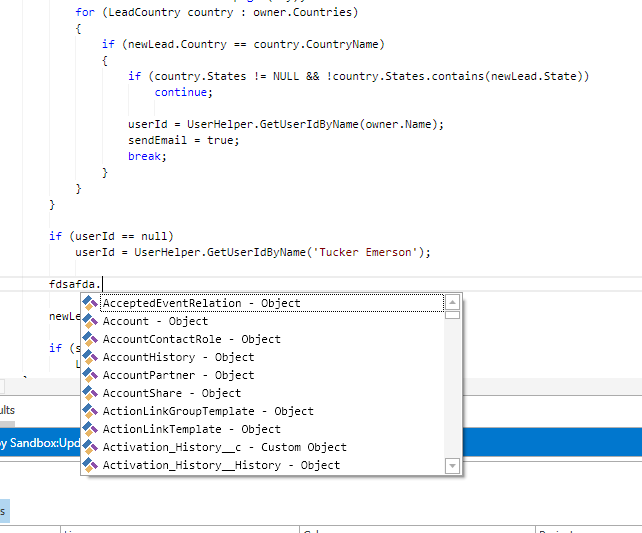
Oddly, for declared objects, nothign comes up at all. As an example, if I declare :
Thank you,
Jason
Oddly, for declared objects, nothign comes up at all. As an example, if I declare :
Lead myLead;
myLead.     <-- Nothing shows up here.
Same applies to SOQL queries, there is no code completion/Intellisense. Is there a compilation that needs to take place to create objects for this code completion to work?
Thank you,
Jason
Customer support service by UserEcho


Sorry to hear that you are having issues. In the next update, we are making a several changes to the editor as well as to all the parsers, and especially to the way it handles autocompletion.
In the meantime can yo check to see you have a file completions.xml and apexModel.xml? Auto complete should be working for SOQL queries and the Lead example you provided. I've provided some examples of how it should look.
lead.png
soql.png
I do see that when I press '.' after a property, there is about a 3-4 second delay (assumedly a spin-up time to query what properties should appear).
Thanks,
Jason
Is there any setup required on the Salesforce side to allow this functionality to work properly?
Not sure if this helps, but it looks like the data is coming into the application as expected.
public class Hello {
The example I gave originally is not working for a trigger, and I failed to mention this in my original post....my apologies for that.
We made some enhancements to the editor in the new update. You can download it from here:
http://files.brainengine.net/release/6/setup.exe
You will have to uninstall your current version before installing this one. Also, please make sure you make a backup of the env and options.xml files to preserve your settings and project definitions.