Welcome to the new BrainEngine support site!
We definitely want to hear your feedback! Submit your Questions, Ideas, Suggestions, and Problems.
We definitely want to hear your feedback! Submit your Questions, Ideas, Suggestions, and Problems.
No similar topics found.


+2
Under review
 Format Document adds whitespace
Hello -
When I use the Format Document feature for an Apex file, the indentation is correctly applied, however spaces are added in certain places. As an example:
Before formatting:
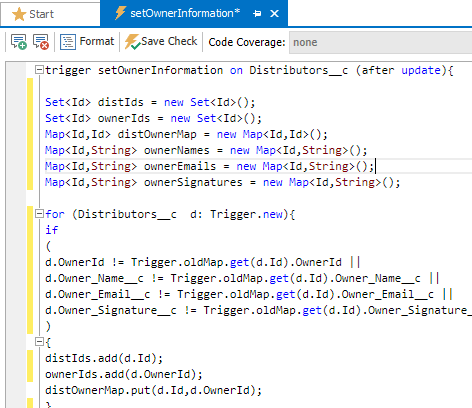
After:
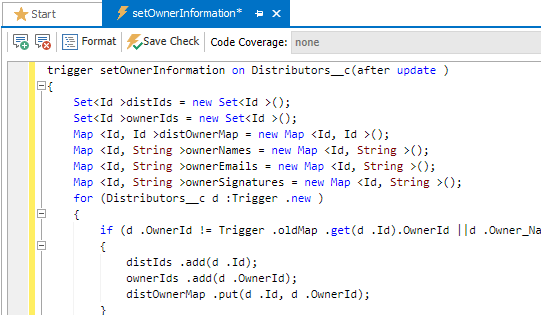
Spaces were added after the update parameter, after the generic types:
Is this on your radar?
Thanks!
Jason
When I use the Format Document feature for an Apex file, the indentation is correctly applied, however spaces are added in certain places. As an example:
Before formatting:
After:
Spaces were added after the update parameter, after the generic types:
Set<Id >
Map <Id, String >
The worst case is dot notation after an object:
if (d .OwnerId != Trigger .oldMap .get(d .Id).OwnerId)
Thanks!
Jason

+2
Under review
 How do use TFS with Cloud Studio?
I would like to use Team Foundation Services with Cloud Studio. I see the connect button but nothing happens.

+2
Planned
 TFS Plugin Enhancements
Replicate the baseline functionality found in other plugins inside of BrainEngine.
+1
Under review
Code Completion question
I'm not sure what the code completion methodology is, however it seems erratic to me. It looks like for standard datatypes like string, List, Map, ... all works well, but that is where it ends. Anytime you bring up code completion for anything else you see the same list of Objects that exist in the org, even for garbage code:
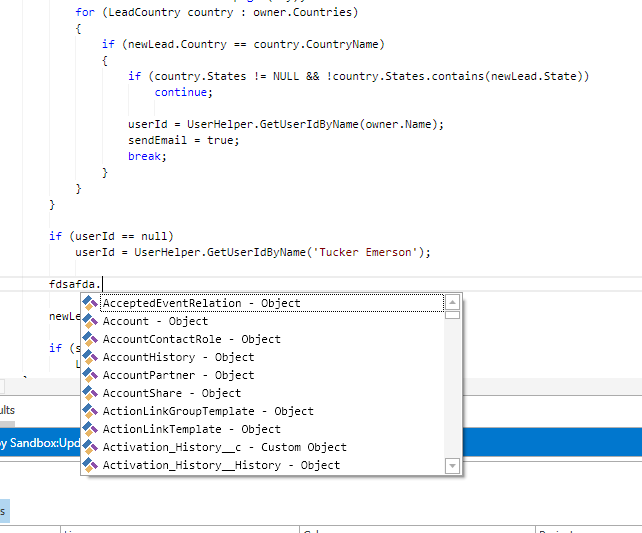
Oddly, for declared objects, nothign comes up at all. As an example, if I declare :
Thank you,
Jason
Oddly, for declared objects, nothign comes up at all. As an example, if I declare :
Lead myLead;
myLead.     <-- Nothing shows up here.
Same applies to SOQL queries, there is no code completion/Intellisense. Is there a compilation that needs to take place to create objects for this code completion to work?
Thank you,
Jason

+1
Started
Cannot access 'Editor - Fonts / colors'
Option is grayed out in built 6.01.102, repair/reinstall did not fix the issue
+1
Started
Apex Editor/Parser Enhancements
Improved support for:
- Auto-Completion
- Find Definitions
- Custom Shortcuts
- Code Outlining
- Theme Support
- Code Coverage

+1
Under review
How to download classes and visual pages
Maybe I do something wrong, but when I connecting to my DevSandbox IDE downloads only Objects and Lightning Resources. How to download classes triggers pages and components?

+1
'Folder' Type metadata not available for download
When downloading/browsing Org MetaData, Folder is not an option.
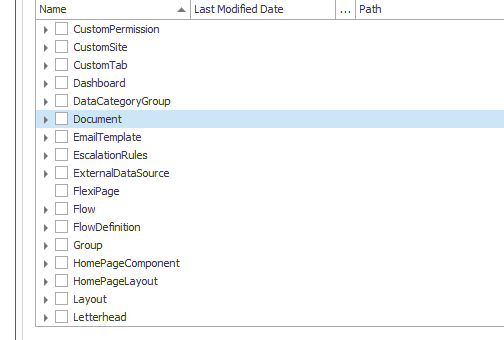
Document/Report/EmailTemplate/DashBoard are all available, but all of these require a Folder to allow deployment. Right now, I have to build the Folder(s) by hand in the Deploy To Org. Once that's done, I can move the other components without issue.
Is there a reason Folder is not an option when downloading metadata?
Customer support service by UserEcho